ELIGIBILITY REQUIREMENTS: AM I ELIGIBLE FOR AN ADSENSE ACCOUNT?
Google is very serious about the quality of their ad network. They are very strict about the requirements, rules, and regulations you need to follow. Below are the requirements you need to adhere to before signing up to AdSense.
- You need to be at least 18 years old.
- You need to have an active Gmail account that isn’t linked to an AdSense account.
- You need to have a website, and that website needs to meet all of Google’s terms of service.
Read more about Google policies here: https://support.google.com/adsense/answer/48182
CREATING A GOOGLE ACCOUNT: HOW TO SIGN UP FOR A GOOGLE ACCOUNT
Although the following tips aren’t written in stone, we believe that they will improve your chances of getting accepted by AdSense.
- Your website should be at least 3 months old.
- You should have at least 30 articles published that are unique and valuable to readers.
- There is no minimum traffic amount that you should have, however the more, the better.
How do AdSense payments work?
There is a minimum threshold of $100 that you need to earn in ad revenue before you can get paid. Also, keep in mind that Google follows a net 30 payment term. As an example, when you earn ad revenue during September, your revenue will be sent out to you in the first week of November – 30 days after the billable month is over.
APPLYING FOR ADSENSE: STEP-BY-STEP GUIDE TO APPLYING FOR AN ADSENSE ACCOUNT
Start by visiting the AdSense website here: https://www.google.com/adsense/start

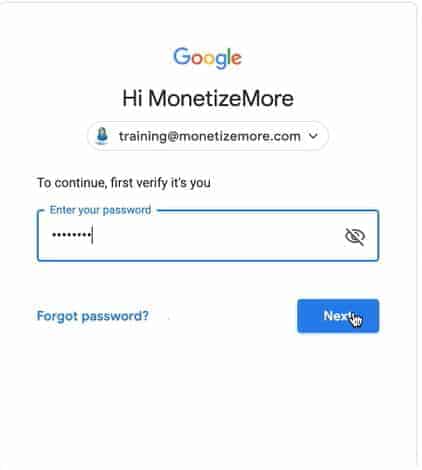
On the same page, click on “Sign in,” and you’ll get directed to a page where you need to sign in to your Gmail account. After entering your email address and password, click on the “Next” button.
Next, you’ll be directed to a page that gives you the following message as shown in the screenshot below. Click on “sign up” to sign up for your AdSense account.

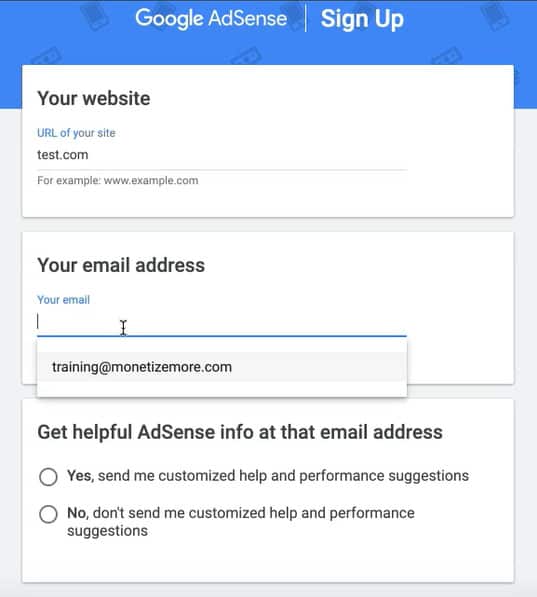
Now you’ll need to enter all your details, which includes your website and email address. You can also opt-in for customized help and performance suggestions from AdSense. Your screen will look something like this:
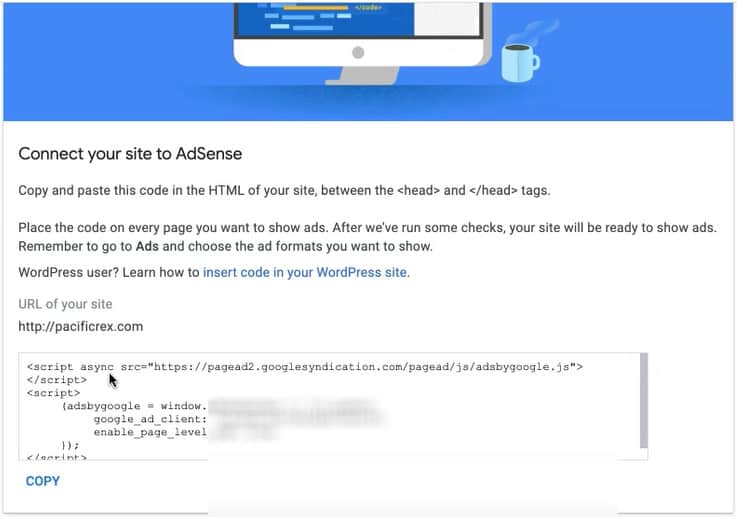
On the next page, you will receive instructions that will enable you to connect your website to AdSense. AdSense will provide you with a snippet of code that you need to add to your site within the <head> </head> section. They will also give you specific instructions on how to do so when you have a WordPress site. Once you’ve inserted the code on your site, click the submit button.

Now your website is ready for the Google AdSense team to review. Be sure to keep the snippet of code live on your site until AdSense responds. Sometimes it takes a few days or up to two weeks for the AdSense team to get back to you. Once you start generating some traffic, be sure to check our Google AdSense courseand find out how to optimize your ads like the pros!
SETTING UP ADSENSE: CONFIGURING YOUR ADSENSE ACCOUNT AND PLACING ADS
Once your account is approved and you can start generating money with ads, it’s a great feeling! However, more often than not, people struggle to find or the Google AdSense login page. It’s real simple, just go to the same URL you visited to register an account: https://www.google.com/adsense/start/. Now, instead of clicking the “Get Started” button, click “Sign In.”

BEST PRACTICES FOR ADSENSE: TIPS FOR MAXIMIZING YOUR AD REVENUE
1. Optimize ad placement: Position ads above the fold, within content, or on high-traffic areas of your website for maximum visibility.
2. Use responsive ad units: Ensure that your ads display correctly on all devices, including desktop, mobile, and tablets.
3. Experiment with ad types: Test different ad formats, such as display ads, link units, and matched content, to find the best performing options.
4. Optimize ad sizes: Use a mix of ad sizes and experiment with different sizes to find the best performing ones.
5. Implement ad unit customization: Customize ad styles to match your website’s design and ensure a seamless user experience.
6. Use page-level ads: Implement page-level ads to capture revenue from mobile traffic that doesn’t click through to your content.
7. Monitor ad performance: Use AdSense’s reporting tools to track ad performance and identify areas for improvement.
8. Optimize ad targeting: Use AdSense’s targeting options to ensure that ads are relevant to your audience and increase click-through rates.
9. Improve website speed: Optimize website speed to reduce bounce rates and increase ad impressions.
10. Stay compliant with AdSense policies: Familiarize yourself with AdSense policies and ensure that your website and ad placements comply with them.
Comments
Post a Comment